
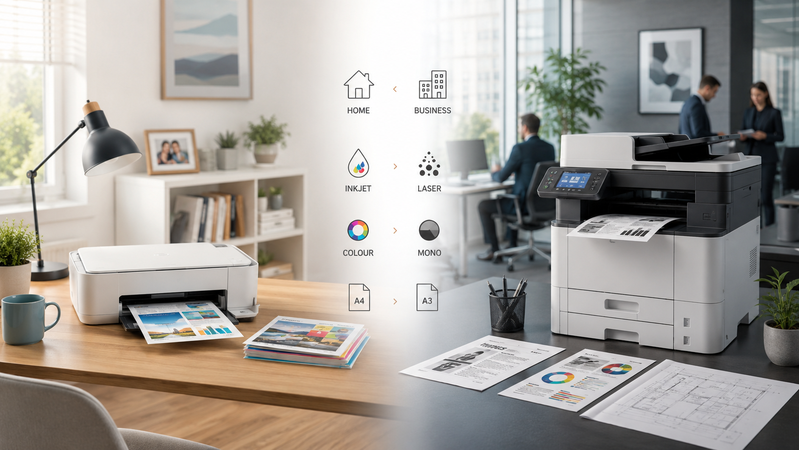
Choosing a printer involves more than comparing purchase prices. The documents you produce, how often you print and whether you need scanning or copying all influence which model will suit you.
A household printing occasional forms has different requirements from a team processing invoices, reports and customer paperwork throughout the day.
This guide explains the main choices and helps you explore suitable options in the Hunter Office Technology printer shop.
Start with Your Printing Habits
Before comparing models, answer a few questions:
- How many pages do you print in a typical week?
- Do you need colour, or mainly black-and-white documents?
- Do you scan and copy regularly?
- Are your documents A4, A3 or another size?
- Will one person or several people use the printer?
- Do you need automatic double-sided printing or scanning?
- What will replacement ink, toner and other consumables cost?
These answers help narrow the range before you start comparing individual features.
Inkjet or Laser?
Inkjet Printers
Inkjet printers use liquid ink and are available with cartridges or refillable tanks.
They are worth comparing for mixed colour documents, household printing and image-based work. Photo quality, supported paper and running costs vary between models, so choose according to the output you need.
Refillable ink-tank models can be attractive for regular printing, but compare the initial price and expected ink costs against your actual usage.
Laser Printers
Laser printers use toner and are commonly considered for text-based documents and office paperwork.
A mono laser printer provides black-and-white output, while a colour laser model adds colour capability.
Compare speed, paper handling, replacement toner costs and multifunction features. The label “laser” alone does not tell you whether a printer suits a small home office or a busy shared workplace.
Shop mono laser printers or browse colour laser printers.
Do You Need Colour?
If most of your printing consists of letters, invoices, forms and study notes, black-and-white output may be sufficient.
Colour is useful for charts, presentations, school projects and documents where different colours help communicate information.
Think about how often you genuinely need it. Compare the cost of owning and supplying a colour printer with your expected use, rather than choosing colour simply because it is available.
Print Only or Multifunction?
A print-only model is suitable when printing is the main task and scanning or copying is handled elsewhere.
A multifunction printer combines several functions in one device, usually printing, scanning and copying, with fax available on selected models.
Check the scanning features carefully:
- Flatbed scanner: You place originals on the scanner glass.
- Automatic document feeder: You load a stack of suitable pages for processing.
- Automatic duplex scanning: The device captures both sides without you manually turning the originals.
An automatic document feeder does not necessarily provide double-sided scanning.
Likewise, automatic double-sided printing and automatic double-sided scanning are separate features. Confirm both if they matter to your work.
A4 or A3?
A4 suits most everyday letters, invoices, forms and reports.
A3 may be useful for larger spreadsheets, diagrams, posters and presentation material. If you need A3 scanning as well as printing, check that both functions support the required size.
You should also allow enough room for the device, open trays and access for replacing supplies.
Browse A3 inkjet printers or explore Epson business printers for a tailored workplace solution.
Three Models to Start Comparing
For Black-and-White Documents: Brother HL-L2445DW
The Brother HL-L2445DW is an A4 mono laser printer with Wi-Fi and automatic double-sided printing.
It is a print-only model, making it worth considering when you mainly produce black-and-white documents and do not need a built-in scanner or copier.
For Colour Printing and Office Paperwork: Brother MFC-L3755CDW
The Brother MFC-L3755CDW combines A4 colour printing with scanning and copying.
It includes automatic double-sided printing and an automatic document feeder. It does not provide automatic duplex scanning, so consider how often you handle double-sided originals.
For Refillable Ink: Epson EcoTank ET-4810
The Epson EcoTank ET-4810 offers A4 colour printing, scanning, copying and faxing with refillable ink tanks.
It is worth comparing for regular home and home-office paperwork. Double-sided printing is manual, and its document feeder does not automatically scan both sides.
These models are starting points for comparison. The most suitable option depends on your workload and required features.
Compare Ongoing Costs
Before purchasing, check the price and rated yield of replacement ink or toner.
Also consider drums, maintenance components and any other consumables required by the model. Cartridge price divided by rated yield gives a basic ink- or toner-only estimate per page, rather than the complete cost of printing.
Actual yields vary with document coverage, settings and usage conditions.
Browse printer ink, toner and consumables to check supplies for the models you are considering.
Buying for a Busy Workplace?
For shared offices, consider more than the maximum print speed.
Paper capacity, scanning capabilities, device placement, network compatibility and support arrangements can all affect day-to-day use.
A managed print review can help assess these requirements together with ongoing costs.
Explore Managed Print Services or learn about Brother Managed Print Services.
Brother MPS-exclusive models are available by enquiry through our team and are not offered for direct online purchase.
Find Your Next Printer at Hunter Office Technology
Start with the jobs you need to complete, then compare printers that meet those requirements.
Shop printers and scanners at Hunter Office Technology to explore the online range.
For help choosing a model, checking supplies or discussing a business print solution, contact our team.