
Upgrade Your Computer from HDD to SSD: Why It’s Worth It
If your computer takes a long time to start or open applications, its storage drive could be part of the problem.
Many older computers use a traditional hard disk drive, or HDD. Replacing it with a compatible solid-state drive, known as an SSD, can improve responsiveness when the hard drive is the main performance bottleneck.
However, an SSD upgrade is not the answer to every slow computer. The right decision depends on your existing hardware, software requirements and the overall condition of the device.
What Is the Difference Between an HDD and an SSD?
An HDD stores data on spinning magnetic disks and uses moving parts to access it.
An SSD stores data electronically using flash memory. It has no moving mechanical parts and can access files much more quickly than a traditional hard drive.
When your operating system and applications are installed on an SSD, the difference can be noticeable during everyday tasks such as starting the computer, opening software and loading files.
What Can an SSD Upgrade Improve?
Moving from an HDD to a suitable SSD can help with:
- Faster computer startup.
- Quicker application loading.
- More responsive access to files.
- Faster storage-intensive tasks.
- Less noise from the storage drive.
The improvement depends on the computer and the work you do. An SSD will not resolve every performance issue, such as insufficient memory, overheating or a slow internet connection.
If your computer already has an SSD, replacing it with another SSD may provide a smaller improvement than upgrading from a mechanical hard drive.
Check Compatibility Before Buying
SSDs come in different sizes and connection types. They are not interchangeable across every computer.
SATA SSDs
Some older laptops and desktops support 2.5-inch SATA drives. A compatible SATA SSD may be an option for replacing an existing hard drive, subject to the computer’s specifications and mounting requirements.
M.2 SSDs
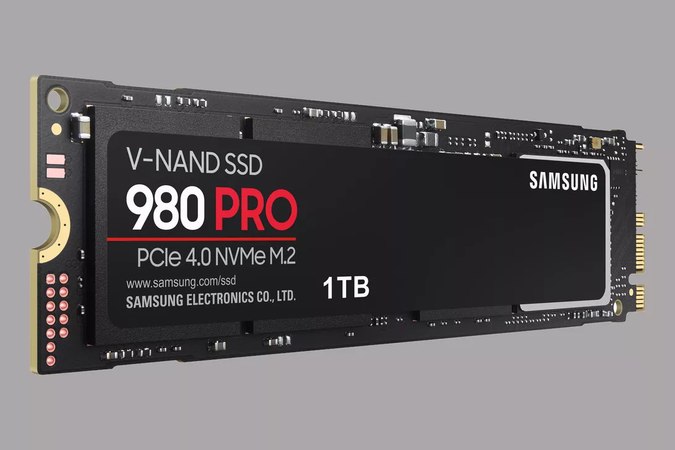
M.2 describes a physical format. M.2 drives can use different interfaces, including SATA and PCIe/NVMe.
A drive fitting into a slot does not, by itself, confirm that it will work. The computer must support the drive’s interface, dimensions and other requirements.
Before purchasing, check the exact computer model and its supported storage options. Some devices have storage that cannot be replaced or upgraded.
How Much Storage Do You Need?
Start by checking how much space you currently use, then allow room for future files, applications and updates.
Documents and spreadsheets usually require less space than large photo libraries, video files or design projects. If you work with large files, consider both capacity and your backup arrangements.
Also check whether the computer supports adding a second drive or whether the existing drive must be replaced.
Choosing an upgrade involves more than buying the largest capacity available. Compatibility, installation and data transfer all need to be considered.
Back Up Before Making Changes
Before replacing a drive, make a separate backup of important files and confirm that you can access it.
Moving to a new drive may involve cloning the existing installation or setting up the operating system and applications again. The appropriate method depends on the condition of the old drive and the computer’s configuration.
Make sure you have access to any required account details, software licences and encryption recovery keys.
If you are unsure about the process, arrange technical assistance before removing or replacing hardware.
External Storage Is a Different Upgrade
External storage can be useful for transferring files, keeping additional copies and expanding the space available for documents.
However, connecting an external drive does not automatically move your operating system off an internal HDD or deliver the same improvement as replacing that internal drive.
Similarly, an SSD enclosure is a housing for a compatible drive. Check whether a drive is included before purchasing.
Browse storage devices in the Hunter Office Technology shop and compare capacity, connections and compatibility with your intended use.
Upgrade or Replace the Computer?
An SSD upgrade may be worth considering when the computer is otherwise suitable for your work and its existing hard drive is limiting performance.
Replacement may be more practical when:
- The computer no longer supports the software you need.
- Its processor or memory also limits your work.
- It has additional faults or physical damage.
- Its storage cannot be upgraded.
- The combined cost of parts and labour is difficult to justify.
Compare the total upgrade cost with the capabilities and expected usefulness of a replacement computer.
If you are considering a new device, shop laptops at Hunter Office Technology to compare the available models.
Getting Help with an SSD Upgrade
A technical assessment can help establish whether the storage drive is causing the slowdown and whether an upgrade is suitable.
For computer troubleshooting, installation and upgrade enquiries, visit our IT and computer repair referral information for details of the support providers we refer customers to.
If replacing your computer is the better option, Hunter Office Technology can help you explore products available through our shop.
Find Your Next Computer or Storage Accessory
An SSD upgrade can be a useful way to improve an older computer, provided the drive is compatible and the rest of the device still meets your needs.
Explore our laptop range or storage devices online.
For questions about products in our shop, contact Hunter Office Technology.