
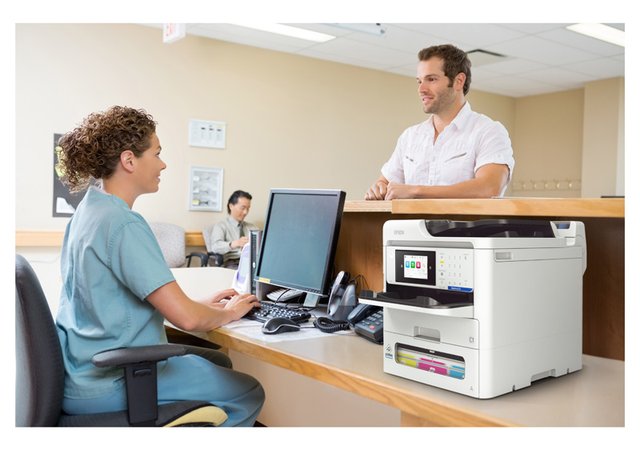
If your workplace needs A4 colour printing, the Epson WorkForce Pro EM-C800 and EP-C800 offer two different approaches.
The main distinction is straightforward: the EP-C800 is a dedicated printer, while the EM-C800 adds scanning, copying and faxing.
Choosing between them starts with understanding how your team handles documents, rather than simply comparing print speeds.
Hunter Office Technology can help you compare both models and discuss a configuration suited to your workplace. Explore our Epson business printer range or contact our team for a tailored quote.
Epson WorkForce Pro EP-C800: Dedicated A4 Printing
The EP-C800 is an A4 colour business inkjet printer for workplaces that need document output without built-in scanning or copying.
It is worth considering when your team already has access to a separate scanner or multifunction device, or when a particular workstation needs its own printer.
Typical uses include:
- Invoices and quotes.
- Customer correspondence.
- Reports and presentations.
- Forms and internal documents.
- Everyday administration paperwork.
A dedicated printer can be a practical choice when its role is clearly defined. Before choosing one, consider whether staff would otherwise need to walk to another device for frequent scanning or copying tasks.
View the EP-C800 in our Epson business range.
Epson WorkForce Pro EM-C800: Print, Scan, Copy and Fax
The EM-C800 combines A4 colour printing with scanning, copying and faxing.
This makes it an option for workplaces that regularly handle both digital files and incoming paper documents. Staff can print a report, copy a form or scan paperwork using the same device.
A multifunction setup may suit:
- Offices processing customer forms.
- Administration teams handling incoming paperwork.
- Professional services businesses managing correspondence.
- Reception areas needing printing and copying.
- Teams digitising documents as part of their daily routine.
When comparing the EM-C800, think about your scanning requirements as well as your printing. The number of pages, use of double-sided originals and intended file destinations all matter.
Explore the EM-C800 or ask our team about your document workflow.
Which Model Fits Your Workplace?
Choose the EP-C800 When Printing Is the Main Requirement
The EP-C800 is worth discussing if you mainly need A4 colour output and have no regular need to scan or copy at that location.
It may also suit a workplace where document scanning is already handled by separate equipment.
Choose the EM-C800 When You Need Multifunction Capability
The EM-C800 is worth discussing if staff regularly switch between printing, scanning and copying.
Having these functions together can simplify document handling, provided the device’s capabilities match your workload.
Consider Another Range When You Need A3
Both models focus on A4 work. If you regularly print or scan A3 documents, compare suitable larger-format devices instead.
Our Epson business printer range also includes A3 options such as the EM-C8100 and EM-C8101.
Compare Running Costs Using Your Actual Workload
The initial price is only part of a printer’s overall cost.
Before selecting either model, consider:
- Your approximate monthly print volume.
- The proportion of colour and black-and-white pages.
- Replacement ink pricing and rated yields.
- Maintenance and servicing requirements.
- Any additional paper trays or accessories.
- The support arrangement you need.
High-yield ink options can reduce the frequency of replacement, but the most economical choice depends on your usage and the price of the supplies.
Published yields are based on standard test conditions. Documents with substantial colour coverage or large images can produce different results from mostly text-based pages.
Hunter Office Technology can help you compare a proposed setup with your existing equipment and consumable costs.
Check How the Printer Will Fit Into Your Office
A printer needs to suit the space and systems around it.
Before ordering, check:
- Placement: Allow room to access paper trays and replace consumables.
- Connectivity: Confirm how the device will connect to your workplace network.
- Software compatibility: Check your computers, operating systems and business applications.
- Paper handling: Identify the sizes and types of documents you regularly print.
- Shared use: Consider how many staff will use the printer and when demand is highest.
- Scanning needs: For the EM-C800, confirm the required scanning functions and destinations.
These details help establish the right configuration before installation.
Epson Business Printers and Managed Print Services
If you want help managing more than the equipment purchase, an Epson printer can also be considered as part of a managed print solution.
A review can look at your current devices, printing volumes, consumable supply and support requirements. The proposed arrangement should clearly explain the equipment, services and ongoing charges involved.
Learn about Epson business print solutions or explore our Managed Print Services.
Looking for a Printer to Purchase Online?
If your requirements are simpler and you would like to compare the online range, browse printers and scanners in the Hunter Office Technology shop.
For the EP-C800 and EM-C800 business models discussed here, contact our team to confirm availability, configuration and pricing.
Discuss the Right Epson A4 Printer for Your Business
The EP-C800 is the print-only option. The EM-C800 adds scanning, copying and faxing. The right choice depends on which functions your team needs and how frequently they use them.
Explore our Epson business printers or contact Hunter Office Technology to discuss your requirements and request a tailored quote.