
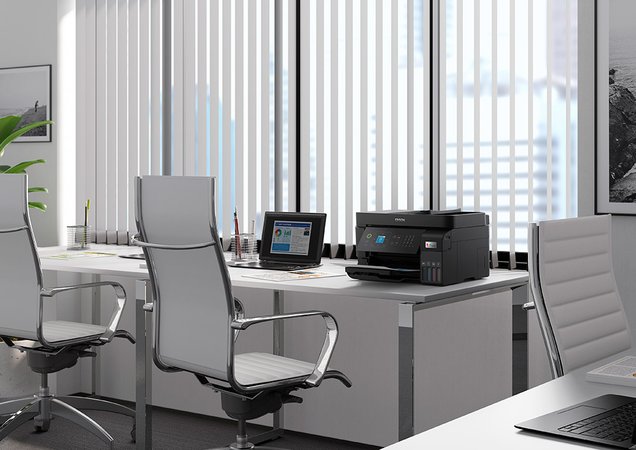
If you regularly print documents, schoolwork and home-office paperwork, a refillable ink printer is worth comparing with a cartridge-based model.
The Epson EcoTank ET-4810 combines A4 colour printing, scanning, copying and faxing with refillable ink tanks.
It also includes an automatic document feeder and network connectivity, making it an option for users who need more than basic printing.
Shop the Epson EcoTank ET-4810 at Hunter Office Technology for current pricing and purchase options.
Key Features
- A4 colour multifunction: print, copy, scan and fax.
- Refillable ink tanks using Epson 522 ink bottles.
- 30-sheet automatic document feeder.
- 100-sheet rear paper feed.
- Wi-Fi, Wi-Fi Direct, Ethernet and USB connectivity.
- Manual double-sided printing: automatic duplex printing is not included.
- Single-sided automatic document feeding: automatic duplex scanning is not included.
The last two points are worth checking against your usual paperwork before choosing this model.
Who Might Find the ET-4810 Useful?
The ET-4810 is worth considering for households, students and home-office users who regularly print both black-and-white and colour documents.
Typical jobs include:
- School assignments and worksheets.
- Study notes and reference material.
- Invoices, quotes and correspondence.
- Forms and household administration.
- Reports containing colour charts or graphics.
- Scanning and copying incoming paperwork.
The right choice depends on how frequently you print, how much colour you need and whether its paper-handling features suit your routine.
How the EcoTank System Works
Instead of replacing conventional ink cartridges, you refill the ET-4810’s tanks using the appropriate ink bottles.
The printer uses separate black, cyan, magenta and yellow inks. You can purchase the required colours individually when it is time to refill.
When comparing EcoTank with a cartridge printer, look at the total cost over your expected usage. Consider the printer’s purchase price, replacement ink costs and how many pages you normally produce.
An ink-tank system may be attractive for regular printing, but the best value depends on your actual workload.
Scanning and Copying Multi-Page Documents
The automatic document feeder lets you load a stack of suitable pages for scanning or copying, instead of placing every sheet individually on the scanner glass.
This can be useful for forms, invoices and other everyday paperwork.
However, the ET-4810 does not automatically scan both sides of an original. If you handle double-sided documents, you will need to capture the reverse sides manually.
For frequent batches of double-sided paperwork, compare a model with automatic duplex scanning or explore our dedicated document scanners.
Check Whether Manual Double-Sided Printing Suits You
The ET-4810 does not have automatic double-sided printing.
Where supported by your computer and printer software, manual two-sided printing requires you to turn and reload the paper as instructed.
That may be acceptable for occasional documents. If you regularly print long reports, readings or other double-sided material, automatic duplex printing may be a feature worth prioritising.
Browse our printers and scanners to compare alternatives.
Replacement Ink for the Epson ET-4810
Hunter Office Technology stocks the Epson 522 ink bottles listed for the ET-4810:
- Epson T522 Black EcoTank Ink Bottle.
- Epson T522 Cyan EcoTank Ink Bottle.
- Epson T522 Magenta EcoTank Ink Bottle.
- Epson T522 Yellow EcoTank Ink Bottle.
Check the bottle series and colour before ordering. Other EcoTank printers may use different inks, so the EcoTank name alone does not confirm compatibility.
Follow the printer’s instructions when refilling, and keep ink levels within the marked limits.
What Affects Running Costs?
Ink usage varies with the documents you print. A page of black text and a colour-heavy worksheet will not use the same amount of ink.
When assessing running costs, consider:
- Your mix of black-and-white and colour pages.
- How much of each page contains text or images.
- Print quality settings.
- Replacement ink pricing.
- Maintenance requirements and other consumables.
Published page yields are based on standard test conditions and should be treated as comparison figures rather than a guaranteed result for every user.
When Should You Consider Another Model?
Another printer may be more suitable if you need:
- Automatic double-sided printing.
- Automatic double-sided scanning.
- A3 output.
- Larger paper capacity.
- Equipment for a busy shared office.
For more demanding workplace requirements, explore our Epson business printer range and contact our team for advice.
If you mainly print black-and-white documents, it is also worth comparing mono laser options before deciding.
Buy the Epson EcoTank ET-4810 from Hunter Office Technology
The Epson EcoTank ET-4810 brings refillable ink, colour printing and multifunction features together for everyday home and office paperwork.
View the Epson ET-4810 in our online shop or use the ink links above to order replacement supplies.
For help comparing printers or checking which supplies you need, contact Hunter Office Technology. availability, pricing and the best printer option for your needs.