
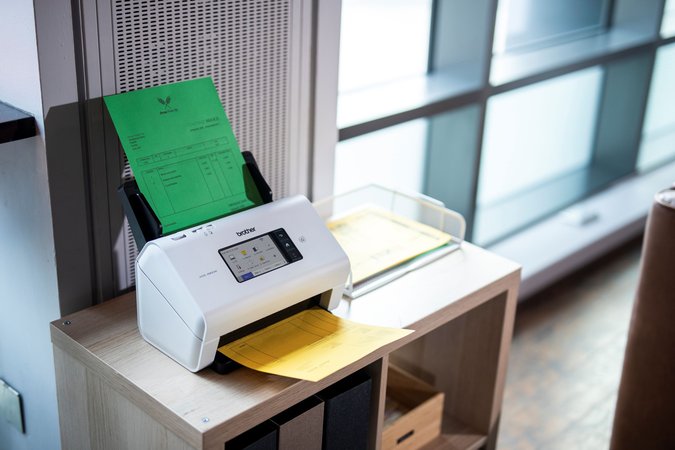
If your business regularly scans invoices, forms, contracts or other paperwork, a dedicated document scanner can be a useful addition to your office.
A multifunction printer may handle occasional scanning well, but a separate scanner gives staff a dedicated place to digitise documents without waiting for the main printer to become available.
Hunter Office Technology’s document scanner range includes options for everyday office paperwork, portable scanning and higher-volume document processing.
Why Choose a Dedicated Document Scanner?
A dedicated document scanner is designed around capturing paper documents. Many desktop models include an automatic document feeder, allowing you to load a stack of pages instead of placing each sheet on the scanner glass.
Depending on the model, features can include:
- Double-sided scanning.
- Automatic document feeding.
- Searchable PDF creation through compatible software.
- USB, wireless or wired network connections.
- Preset scanning settings for repeat tasks.
- Support for different document sizes and types.
These features can help simplify recurring jobs such as scanning supplier invoices, signed forms, delivery paperwork and customer records.
The right choice depends on your workload. A small office scanning a few documents each day will have different requirements from a team processing large batches of paperwork.
Make Digital Filing Easier
Scanning documents is only part of the process. Being able to find them later is just as important.
Optical character recognition, usually called OCR, converts text within a scanned image into text that software can recognise. With suitable software, this allows you to create searchable PDFs and find documents using words, names or reference numbers.
Before choosing a scanner, check whether the included software supports the file formats and OCR features you need.
It also helps to agree on a simple filing process:
- Use consistent file names.
- Create folders that match how your business works.
- Check scans are complete and readable.
- Limit access to confidential documents.
- Include scanned files in your normal backup process.
A scanner works best when it fits into a clear system for saving and managing documents.
Which Workplaces Can Benefit?
Dedicated document scanners can be useful wherever paper forms and records remain part of everyday work.
Accounting and bookkeeping offices may need to digitise invoices, receipts and supporting documents.
Medical and allied health practices may scan referrals, completed forms and signed paperwork into their existing records systems.
Legal and professional services businesses may process contracts, correspondence and client documents.
Real estate offices may handle rental applications, inspection paperwork and property documents.
Warehouses and logistics teams may scan delivery dockets, supplier paperwork and signed receipts.
For each workplace, the important question is how well the scanner fits the documents, software and filing process already in use.
Brother and Epson Scanners to Compare
Hunter Office Technology offers Brother and Epson document scanners through our online shop. The following models provide useful starting points when comparing options.
Brother ADS-3350W
The Brother ADS-3350W document scanner is an option to consider for everyday desktop document scanning.
If your team regularly processes invoices, forms and other multi-page documents, compare its paper handling, connection options and software compatibility against your daily requirements.
View the Brother ADS-3350W in our shop.
Brother ADS-4900W
The Brother ADS-4900W document scanner is worth comparing when scanning is a regular part of a busy team’s workload.
For larger batches, pay particular attention to feeder capacity, scanning speed and how staff will send documents to their intended destination.
View the Brother ADS-4900W in our shop.
Epson WorkForce DS-570WII
The Epson WorkForce DS-570WII document scanner is another option for businesses comparing desktop document scanners.
Review its connection options, document handling and included software to see how it would fit your office’s scanning and filing routine.
View the Epson DS-570WII in our shop.
Epson WorkForce DS-900WN
The Epson WorkForce DS-900WN document scanner is an option to explore for a shared business scanning environment.
When comparing it with other models, consider how many people need access, the volume of paperwork and the scan destinations your business uses.
View the Epson DS-900WN in our shop.
What to Check Before Buying a Scanner
Your Scanning Volume
Think about both your average daily workload and your largest scanning jobs. Feeder capacity and the manufacturer’s recommended daily volume can help you compare models.
Double-Sided Documents
If you regularly scan documents printed on both sides, look for automatic duplex scanning. Check whether the scanner captures both sides in a single pass.
Document Types
Standard office paper is only part of the picture. Receipts, business cards, long documents, fragile originals and bound material may need different handling.
Check the supported paper sizes, thicknesses and document types before purchasing. A sheet-fed scanner may not be suitable for books or delicate originals.
Connection Options
USB can suit a scanner used at one workstation. Wireless or wired network connectivity may be useful where several people need access.
Confirm that the model supports your intended setup, including any required software or network configuration.
Software Compatibility
Check compatibility with your computers, operating systems and document management software. If you need searchable PDFs or particular scan destinations, confirm how those features work before buying.
Dedicated Scanner or Multifunction Printer?
A multifunction printer can remain a practical choice if you scan occasionally and want printing, copying and scanning in one device.
A dedicated scanner becomes more useful when:
- Scanning is part of your daily workflow.
- Staff regularly process batches of paperwork.
- You want a scanning station close to the people handling documents.
- Scanning jobs compete with use of the main office printer.
- You need document-handling features suited to a particular task.
The two devices can also work alongside each other. Your multifunction printer can handle general office jobs while a dedicated scanner manages recurring document processing.
If you are comparing both approaches, browse our printers and scanners to explore the options.
Find the Right Document Scanner for Your Business
Start with the documents you scan, the volume you handle and where the finished files need to go. Those details will help you choose a scanner that fits your business.
Shop document scanners at Hunter Office Technology to compare models and view current pricing.
For help narrowing down the options, contact our team with your scanning requirements and the software your business uses.