
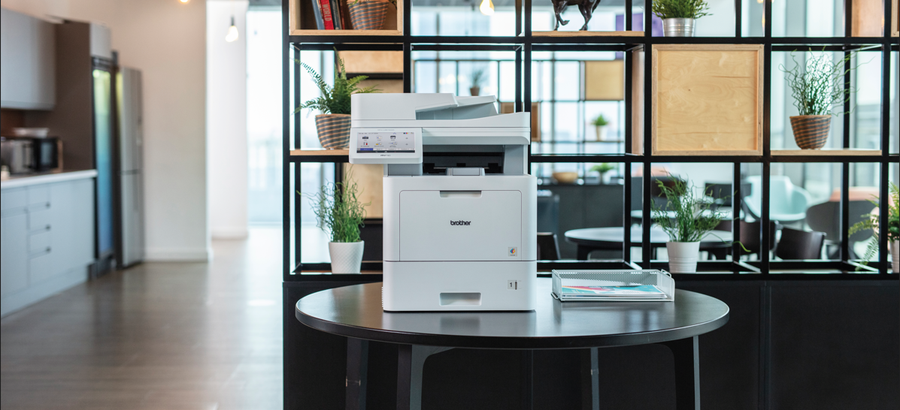
When several people rely on the same printer, document handling matters just as much as print speed. Your team may need to print reports, copy forms and scan double-sided paperwork throughout the day.
The Brother MFC-L9670CDN combines colour laser printing, scanning, copying and faxing in a business multifunction device.
Hunter Office Technology offers this model through our Brother business print and Managed Print Services offering. Machine and MPS toner pricing is handled by enquiry rather than direct online purchase.
Contact Hunter Office Technology to discuss whether the MFC-L9670CDN suits your workplace.
Key Features
The MFC-L9670CDN includes:
- Print speeds of up to 40 pages per minute.
- Automatic double-sided printing.
- Automatic double-sided scanning at up to 100 images per minute.
- Colour and black-and-white output.
- Print, scan, copy and fax functions.
- Gigabit Ethernet connectivity.
- Optional wireless connectivity.
Wireless requires the appropriate optional module, so include this requirement when requesting a quote.
Printing for a Shared Workplace
The MFC-L9670CDN is worth considering for teams producing reports, correspondence, contracts, forms and other business documents.
Colour output can be useful for charts, headings and presentations, while automatic double-sided printing helps reduce paper use where appropriate.
Before choosing a shared printer, consider how often staff print and whether demand arrives in short bursts or continues throughout the day. Your typical workload is more useful than maximum print speed alone when comparing models.
Automatic Double-Sided Scanning
For businesses that handle incoming paperwork, scanning can be a significant part of the workload.
The MFC-L9670CDN supports automatic duplex scanning, allowing both sides of suitable originals to be captured without manually turning each page.
Its quoted scan speed is measured in images per minute. Each scanned side counts as one image, so this figure should not be confused with the number of physical sheets processed.
When planning your setup, consider:
- How many documents you scan each day.
- Whether originals are single-sided or double-sided.
- The sizes and condition of the documents.
- Where scanned files need to be saved.
- Compatibility with your document management software.
A clear filing process also helps staff name, store and retrieve scanned documents consistently.
Configure Paper Handling Around Your Work
Paper requirements vary between offices. Some teams mainly use standard A4 paper, while others regularly switch between letterhead and other supported media.
Optional paper trays can provide additional capacity and help organise different paper stocks. The suitable configuration depends on your workload, available space and the accessories supported by the device.
Discuss these requirements before ordering so your quote includes the equipment your team actually needs.
High-Yield Toner and Ongoing Costs
The MFC-L9670CDN supports high-yield replacement toner options, including rated yields of up to 15,000 pages for black and 12,000 pages for each colour.
Actual yield varies with document coverage and usage conditions. Pages containing substantial colour graphics can use more toner than simple text documents.
For an accurate comparison, consider:
- Your monthly print volume.
- Your proportion of colour and black-and-white pages.
- The quoted toner pricing and yields.
- Other replacement consumables.
- Servicing and support arrangements.
- Any equipment or accessories included in the proposal.
Hunter Office Technology can discuss eligible MPS toner options and prepare pricing based on your requirements.
Enquire about the MFC-L9670CDN and its consumables.
Which Businesses Might Consider This Model?
The MFC-L9670CDN is worth assessing for workplaces where printing and scanning are regular shared tasks.
Examples include:
- Accounting and legal offices.
- Medical and allied health practices.
- Real estate and professional services businesses.
- Schools and administration teams.
- Warehouses and logistics offices.
A smaller device may be sufficient for occasional printing. If you only need black-and-white output, a mono model may also be worth comparing.
The right recommendation depends on your documents, usage and support requirements.
How It Fits into Managed Print Services
A managed print arrangement considers how equipment, consumables and support will work together.
Hunter Office Technology can review your existing printers and discuss whether the MFC-L9670CDN fits your wider setup. This may involve considering device placement, scanning requirements, toner supply and ongoing assistance.
Your proposal should explain what is included, how charges are calculated and which services or consumables are handled separately.
Learn more about Brother Managed Print Services or explore our Brother business printer information.
Enquire About the Brother MFC-L9670CDN
The Brother MFC-L9670CDN is a business multifunction option for teams that need colour printing, automatic double-sided scanning and flexible paper handling.
This model and its MPS supply options are handled through consultation with Hunter Office Technology, rather than direct online checkout.
Contact our team for a tailored quote. Share your approximate monthly print volume, colour usage, scanning requirements and any problems with your current equipment so we can help assess the right setup.