
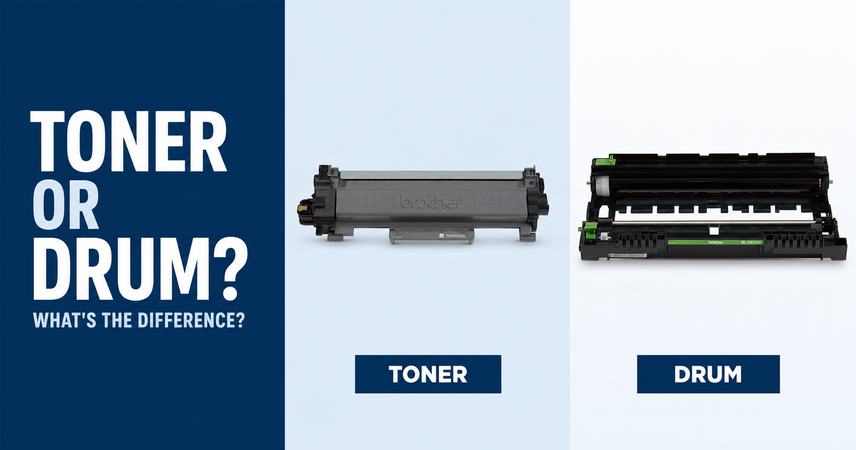
If your printer displays “Replace Toner” or “Replace Drum”, it is asking for attention to two different components.
The toner cartridge contains the powder used to create printed text and images. The drum is part of the imaging system that helps transfer that toner onto the page.
Understanding the difference helps you order the correct supply and avoid replacing a component unnecessarily.
Browse toner, drum units and laser printer consumables at Hunter Office Technology.
What Does a Toner Cartridge Do?
A toner cartridge supplies the fine powder used in laser and LED printing.
Black-and-white printers use black toner. Colour models typically use black, cyan, magenta and yellow.
Toner is consumed as you print, so the cartridge eventually needs replacing. A “Toner Low” message usually indicates that you should prepare a replacement, while the printer’s instructions explain what to do when it reaches its replacement point.
Faded output can have several causes. Check the printer’s message and troubleshooting guidance before assuming the toner is responsible.
Shop toner and laser printer supplies.
What Does a Drum Unit Do?
The drum has a light-sensitive surface used in the printer’s imaging process. It helps form the toner image that is transferred onto the paper.
The drum and toner work together, but they perform different jobs. Adding a new toner cartridge does not replace a separate worn drum.
Brother explains this distinction in its toner cartridge and drum unit guidance.
Are Toner and Drum Units Always Separate?
No. The arrangement depends on the printer model.
Some printers use separate toner cartridges and drum units. Others combine the components in a replacement cartridge assembly.
For printers with separate components, each has its own replacement requirements. You do not automatically need a new drum every time you replace toner.
Check your model’s instructions and the product description before ordering. Similar-looking supplies can have very different functions.
What Should You Do When a Warning Appears?
Start by recording the exact message. “Toner Low”, “Replace Toner”, “Drum End Soon” and “Replace Drum” are not interchangeable.
Then:
- Find the printer’s full model number.
- Check the relevant instructions in its user guide.
- Identify the required supply code.
- Confirm compatibility on the replacement product listing.
- Ask for assistance if the message or required part is unclear.
For business printers covered by a managed print agreement, contact your provider before ordering supplies separately.
Can Marks or Lines Mean the Drum Needs Replacing?
Repeated marks, streaks or uneven output may involve the drum, but those symptoms can also have other causes.
Paper, toner, contamination and other printer components can affect the result. Buying a drum without checking the cause may not resolve the problem.
Keep a sample showing the defect and note whether it appears:
- On every page or only occasionally.
- In the same position.
- In one colour or several.
- During printing, copying or both.
This information can help when you contact our team or request a printer service call.
Follow the Replacement Instructions for Your Model
Installation procedures vary, so follow the manufacturer’s guide for the exact printer.
Avoid touching the drum’s imaging surface or attempting improvised cleaning. Keep protective packaging in place until you are ready to install the replacement.
Some models require a drum counter reset after fitting a new unit. Only perform the reset as directed during the replacement procedure. Clearing a counter does not repair a worn component.
If you are unsure about installation, ask for guidance before proceeding.
How to Choose the Correct Toner or Drum
Use the printer model and supply code together when checking compatibility.
Before ordering, confirm:
- Whether you need toner, a drum or another maintenance component.
- The exact printer models supported.
- The required colour, where applicable.
- Whether the listing is for one unit or a set.
- Whether you are selecting a genuine or compatible product.
- Any relevant requirements under your existing service agreement.
Do not rely on the brand name or product photograph alone.
Browse our printer consumables to compare available supplies.
Include Maintenance Components in Running Costs
Toner is only one part of a laser printer’s ongoing cost.
Depending on the model, separate drums, waste-toner containers, belts or other maintenance components may also require replacement.
When comparing printers, consider the cost and expected replacement intervals of the relevant supplies alongside toner pricing. Actual component life depends on the printer and how it is used.
For a wider review of equipment, consumables and support, explore Managed Print Services.
Find the Right Replacement at Hunter Office Technology
If your printer needs toner or a drum, shop laser printer consumables at Hunter Office Technology.
For help identifying the correct item, contact our team with the printer model, supply code and exact message displayed.
If poor output continues or the cause is unclear, visit our printer warranty and repair service page to arrange the appropriate support.