
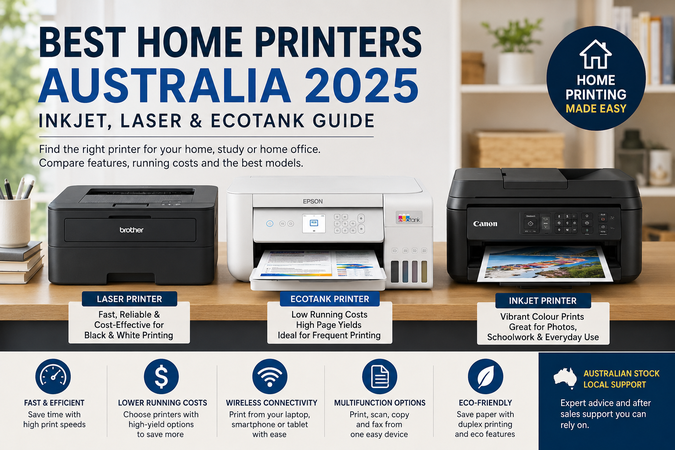
Finding the best home printer in Australia in 2025 depends on how you print, how often you print and what you need the printer to do. Some households only print the occasional form or school assignment, while others need a reliable home office printer for invoices, scanning, labels, homework, colour documents and everyday admin.
At Hunter Office Technology, we stock a wide range of home printers from leading brands including Brother, Epson and Canon, with options to suit simple home use, study, work-from-home setups and small office environments.
Before choosing a printer, it is worth understanding the main differences between inkjet, laser and ink tank printers.
Inkjet vs Laser: Which Is Best for Home Use?
Inkjet printers are a popular choice for home users because they are usually affordable upfront and can print in colour. They are suitable for school projects, photos, recipes, craft documents, occasional forms and general family printing.
A standard inkjet printer may be the right choice if you print occasionally and want a compact colour printer without spending too much upfront. Prices for entry-level home printers can start from under $100, depending on the model and availability.
Laser printers are different. Instead of liquid ink, they use toner. A mono laser printer is ideal if you mostly print black-and-white documents, such as forms, invoices, study notes, shipping labels, work documents and emails. Laser printers are generally faster, sharper for text and often more economical for regular document printing.
If you rarely need colour, a mono laser printer can be one of the smartest home printer choices.
Why EcoTank Printers Are Popular
For families, students and home office users who print regularly, an Epson EcoTank printer can be a great long-term option.
Unlike traditional cartridge printers, EcoTank models use refillable ink tanks. This means you fill the printer using ink bottles instead of replacing small cartridges. The upfront cost is usually higher, but the running costs can be much lower over time, especially if you print frequently.
EcoTank printers are a strong choice for:
- Families printing schoolwork and colour documents
- Home offices printing invoices, reports and forms
- Students printing notes and assignments
- Users who want fewer cartridge replacements
- Anyone who wants lower long-term ink costs
A model such as the Epson EcoTank ET-2950 is a great example of a inktank home office printer. It offers print, copy, scan, fax, Wi-Fi, and Ethernet making it suitable for more demanding home office use.
Recommended Home Printer Options
Best for Basic Home Printing
If you only print occasionally, an entry-level inkjet printer may be enough. These are usually the cheapest printers to buy and are suitable for simple colour printing, homework, forms and occasional documents.
Model : Canon TS3660
Expected price range: approximately $69–$150
Best for: light home use, occasional colour documents and basic printing
Best for Black-and-White Documents
If you mostly print text, a mono laser printer is usually the better option. The Brother HL-L2445DW is a strong choice for home users, students and small offices that need fast, sharp and reliable black-and-white printing.
It is compact enough for a home office, supports wireless printing and includes automatic two-sided printing to help reduce paper use.
Recommended model: Brother HL-L2445DW
Expected price range: approximately $150–$250
Best for: forms, study notes, work documents, invoices and labels
Best for Home Office and Frequent Printing
If you print often and need colour, scanning and copying, an Epson EcoTank model is worth considering. The Epson EcoTank ET-2950 is a strong home office option because it combines low running costs with helpful features such as fax, Ethernet and Wi-Fi.
Recommended model: Epson EcoTank ET-2950
Expected price range: approximately $300–$800+
Best for: home offices, regular colour printing, scanning, copying and admin work
Best for Families and Students
Families often need a mix of colour printing, schoolwork, scanning and occasional photo-style documents. A mid-range inkjet or EcoTank model is usually a better fit than the cheapest printer on the shelf, especially if it will be used regularly.
Recommended type: colour inkjet multifunction or EcoTank printer
Expected price range: approximately $150–$500
Best for: school projects, forms, recipes, assignments and family use
Best for Low Running Costs
If your main concern is the cost of ink, look beyond the printer price. Cheaper printers often use smaller cartridges, which can become expensive if you print regularly.
For low running costs, consider:
- Epson EcoTank printers for colour printing
- Brother mono laser printers for black-and-white documents
- High-yield cartridge or toner options where available
Spending more upfront can often save money over the life of the printer.
What Features Should You Look For?
When comparing home printers in 2025, consider the features that will actually matter day to day.
Wi-Fi printing is important for most homes, especially if multiple people need to print from laptops, phones or tablets. Automatic two-sided printing is also useful, as it helps save paper. If you scan documents regularly, choose a multifunction printer with a flatbed scanner. If you scan multi-page documents, look for an automatic document feeder.
You should also check the cost of replacement ink or toner before buying. A printer may look cheap, but the ongoing consumable cost is often what matters most.
Need Help Choosing the Right Home Printer?
The best home printer is not the same for everyone. A student printing study notes may be better suited to a Brother mono laser printer, while a family printing school projects may prefer a colour inkjet or EcoTank. A home office user may need a more capable multifunction device with scanning, copying and lower running costs.
At Hunter Office Technology, we can help you compare options and choose the right printer for your home, study or work-from-home setup.
Explore our printer range here:
Contact Hunter Office Technology today or browse our home printer range to find a printer that suits your needs and budget.